


iOverlander
3.9589.00 Reviews
App Specs
- Version
- 2.6.40
- Updated On
- License
- Free
- Downloads
- 500,000+
- Developer
- iOverlander LLC
- Categories
- Travel & Local
- Platform
- Android
Screenshots
 Analysis by AppCompare
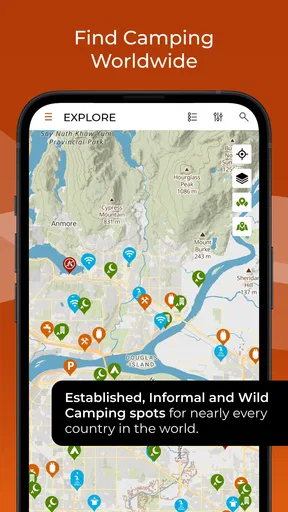
When I plan a trip beyond familiar highways, the hardest question is often not where to go but where I can stop once I get there. iOverlander is a travel app built around that practical problem: finding places to camp and useful stops along the way, including in remote areas. I see its real value less as a substitute for a complete itinerary and more as a second set of eyes when the route gets uncertain.
Quick answers, not a full trip plan
For a simple journey between well-served towns, a regular map app may be faster for turn-by-turn directions and nearby businesses. iOverlander has a different job. Its map and community-submitted place information are most useful when I want to investigate possible camping areas or check what travelers have reported about a stop that standard navigation may not make easy to judge.
That distinction helps set sensible expectations about speed. I would open it before reaching a likely stopping point, rather than wait until I am tired, offline, and trying to make a decision from the roadside. Looking over options while I still have time to compare them makes the app feel more helpful and keeps the search from becoming an urgent task.
When the map gets a workout
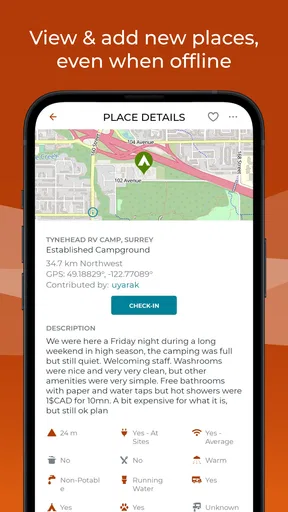
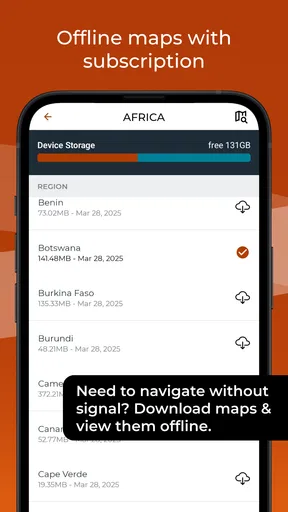
The app becomes more valuable when a trip involves several possible overnight stops, a detour, or stretches where reception may be unreliable. A useful habit is to check the map while planning the day, then save the relevant map and information for offline use before leaving coverage. That way, the app is part of preparation, not a rescue plan that depends on a signal being available at exactly the wrong moment.
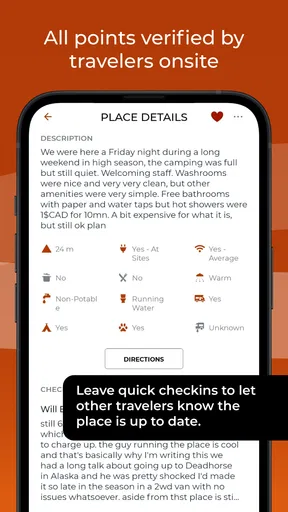
I would also treat community notes as clues rather than guarantees. Conditions at a campsite or roadside stop can change, and a report reflects someone’s visit, not a promise about what I will find. If a location matters to the day’s plan, I would keep another option in mind and use recent-looking comments to decide whether it still sounds suitable. That small bit of caution is especially worthwhile when the stop is remote or arriving late would be inconvenient.
Reliability is a planning habit
Offline access is a meaningful strength, but it does not remove the need to prepare. Download the areas you expect to use while you have a dependable connection, and check that the information you need is available before you head farther out. I would not assume that an app can replace local judgement, a paper backup, or a second navigation option on a trip where losing access would create a serious problem.
That is not a knock on iOverlander so much as a sensible way to travel. The app’s community approach can reveal places and practical comments that I might otherwise miss, while the same crowd-sourced nature means details deserve a quick reality check. I would use it to broaden my choices, not to make every decision automatically.
Worth Reading Before You Choose

EA SPORTS FC Mobile 26 Is a Bigger Football Game, but It Takes Time

Flipboard Shows What News Apps Must Do Beyond the Feed

Switching to Android Auto Means Rethinking Your Driving Routine

Google Calendar Makes a Crowded Week Easier to Manage

Ludo King Makes the Most of the Minutes Between Plans

Baby Panda World Brings Quick Play to Modern Phones, but Its Game Library Feels Busy
Who will get the most from it
This is a natural fit for campers, road-trippers, and travelers who like to leave room for a change of plan. It is also useful for someone who wants to research a destination before departure and keep possible stops in one place for reference. If I mostly travel within cities and need transit times, restaurant bookings, or tightly managed day plans, I would reach for apps designed around those tasks instead.
For a realistic example, imagine finishing a long drive later than expected and needing to choose between continuing toward a planned campground or stopping earlier. I would check iOverlander for nearby possibilities and read the community context, then compare that with my remaining daylight, route, and comfort level. The app can help surface options; it cannot decide whether a particular site is right for me that evening.
What the catalog details mean in practice
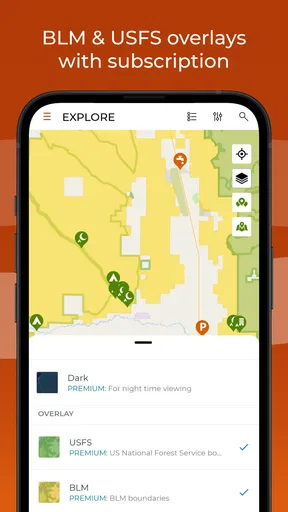
Developed by iOverlander LLC, this free Travel & Local app has a 4.2 average from around 6,600 ratings and more than 100,000 installs. It is rated Teen, and its current version is 2.6.17. The basic no-cost entry point makes it easy to try before building a trip around it, while in-app purchases range from about $10 to $100 per item. I would check what an optional purchase covers in the app before paying, rather than assume every useful capability is included or that an upgrade is necessary for my kind of travel.
For device expectations, the listed minimum is Android 7.0, so an older phone may not meet the requirement. Beyond that, I would avoid judging performance by the map alone: loading detail can depend on connection quality and how much area I am exploring. I have no reason to treat the app as a replacement for a dedicated navigation tool, and I would keep enough battery and local map access for the day’s route instead of relying on any single app to carry the whole trip.
Discovering the World with iOverlander
Alright, let's dive into what makes iOverlander such a game-changer for those of us who can't resist a good road trip. Picture this: you're cruising down a scenic route, and suddenly, you're craving a spot to camp under the stars. Or maybe you're in desperate need of a gas station that won't make you feel like you've stumbled into a horror movie. This is where iOverlander steps in like a trusty sidekick.
User-Friendly Interface
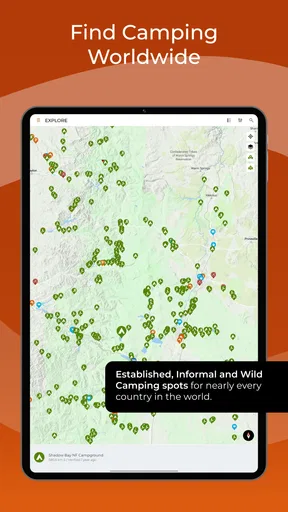
First off, the app's user interface is super intuitive. I mean, you don’t have to be a tech wizard to figure it out. The moment you fire it up, you're greeted with a map that feels like a treasure map, just waiting to be explored. You can easily zoom in and out to get a lay of the land, and icons quickly show you what's nearby—be it a campsite, gas station, or even a Wi-Fi hotspot.
Comprehensive Database
What really blew me away is the sheer volume of information this app packs. It’s like having a travel guidebook but without the extra weight in your backpack. The app’s database is filled with user-contributed locations from all over the globe, which means it’s constantly updated with new spots. Whether you're in the middle of a bustling city or exploring the backroads of nowhere, chances are, iOverlander has got something for you.
Community-Driven Insights
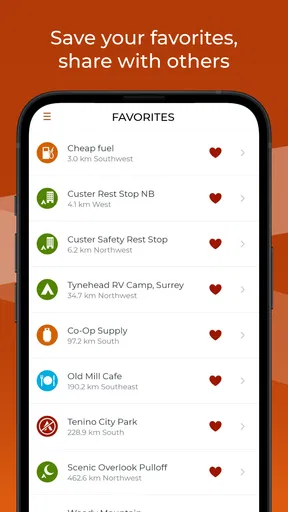
One of the coolest features is the community-driven aspect. Users can leave reviews and tips about the places they've visited. Think of it as getting advice from a friend who's already been there, done that. Want to know if that campsite really has a breathtaking view, or if the Wi-Fi at that café is actually reliable? Just check the reviews, and you'll have your answer.
Offline Accessibility
Now, if you’re venturing into areas where cell service is a myth, no worries. The app allows you to download maps and information for offline use. This feature is a lifesaver, especially when you find yourself in those "no bar" zones. I can’t tell you how many times this has come in handy for me!
Personal Experience
On my recent road trip through the Southwest, iOverlander was my go-to app. I stumbled upon a charming little campsite that wasn’t even on Google Maps, all thanks to a fellow traveler’s recommendation on the app. The place was serene, surrounded by towering red rocks and had the clearest night sky I've ever seen. It’s these unexpected discoveries that make travel so rewarding.
Room for Improvement
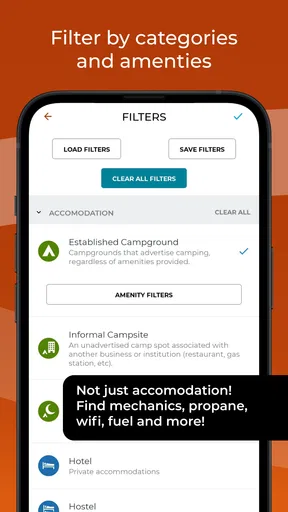
Of course, no app is perfect. While iOverlander offers an incredible amount of information, it can sometimes feel a bit overwhelming. A few times, I wished for a filter option to narrow down the search results based on my preferences. But honestly, the positives far outweigh this minor hiccup.
In conclusion, if you're looking for an app that turns your travel adventures into smooth sailing, iOverlander is a must-have. It’s like having a trusty co-pilot who knows all the best pit stops and scenic routes. So, go ahead, download it, and let the adventures begin!
My performance verdict
In day-to-day use, I would treat iOverlander as a discovery and preparation tool rather than an app that must answer instantly at every stop. The map makes browsing feel approachable, but the amount of community information can make choosing between places take longer than expected. I would narrow my decision with practical questions—does the location suit tonight’s route, do the comments address what I need, and do I have a fallback? That is more effective than scrolling through every nearby marker.
My overall recommendation is strongest for people who travel with flexibility and are willing to verify a promising stop before depending on it. For a highly structured city visit or a trip where precise navigation is the priority, a conventional maps or navigation app is the better primary tool. For a camper curious about less obvious places, iOverlander can add useful local context and alternatives. I would keep it in my travel toolkit, prepare offline information before remote stretches, and let my own judgement make the final call.
Pros
- Comprehensive database of camping spots.
- User-generated reviews enhance reliability.
- Offline maps for remote areas.
- Easy GPS integration for navigation.
- Regular updates with new locations.
Cons
- Interface can be slightly cluttered.
- Limited support for non-English languages.
- Occasional outdated location info.
- Requires significant storage space.
- Some features need stable internet.
FAQs for iOverlander
What is iOverlander used for?
iOverlander is an essential app for travelers, especially overlanders, providing a comprehensive database of campsites, amenities, and points of interest around the world. It helps users find places to stay, refuel, and restock supplies, all while enabling them to share their own discoveries and experiences with the community.
Is iOverlander available offline?
Yes, iOverlander offers offline functionality, allowing users to download maps and location data. This feature is particularly useful for travelers in remote areas without internet access, ensuring they can still access critical information and navigate effectively without a constant connection.
How accurate is the information provided in iOverlander?
The information in iOverlander is user-generated, meaning its accuracy can vary. However, the community actively updates and moderates content, ensuring that the data remains relatively reliable. Users are encouraged to contribute by adding new locations or updating existing information, enhancing the app's overall accuracy.
Are there any costs associated with iOverlander?
iOverlander is free to download and use, with no hidden fees or premium subscriptions. The app relies on community contributions and operates as a nonprofit, making it accessible to all travelers without financial barriers. Users can support the app through donations to help maintain its development.
How does iOverlander ensure user privacy?
iOverlander respects user privacy by not requiring personal information for basic use. Users can choose to create an account for additional features, but this is optional. The app does not track user locations or activities, ensuring a safe and private experience for all travelers.


